

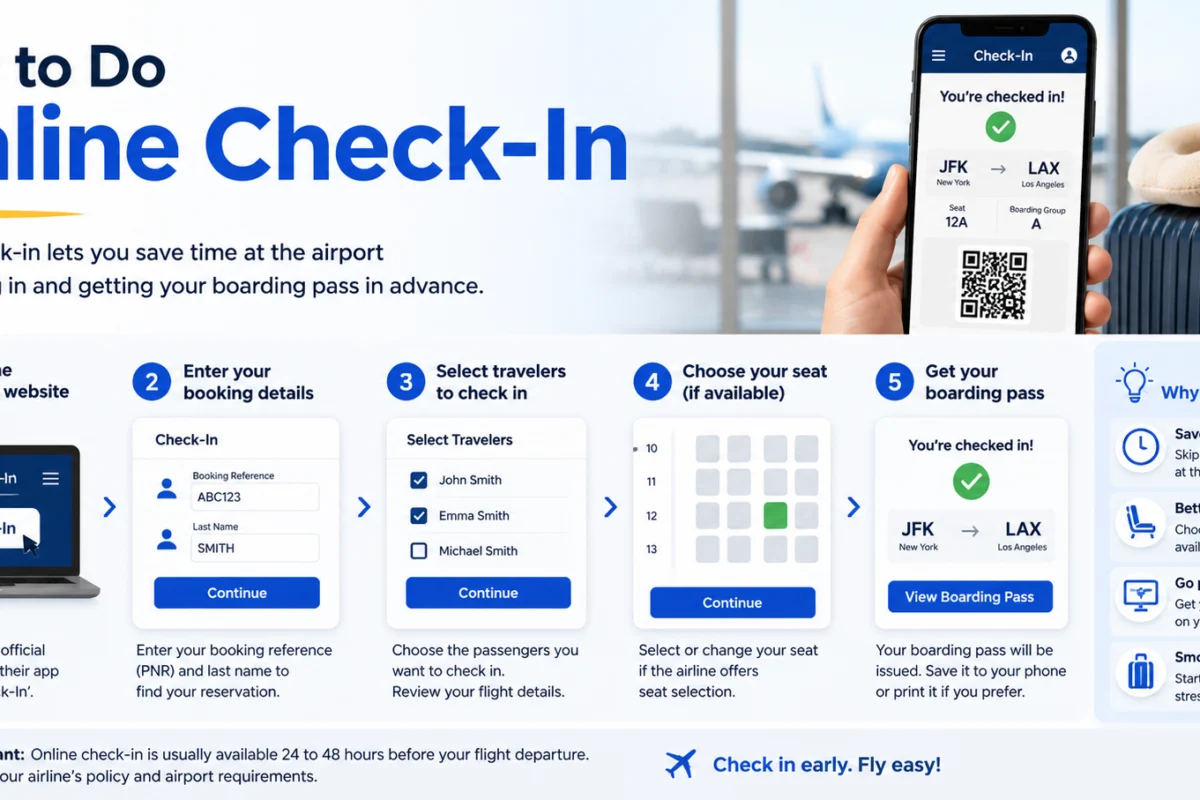
How to Do Online Check-In :-Nobody enjoys standing in a long airport queue with a heavy suitcase, a restless child, and a nagging feeling that the desk closes in ten minutes. The good news is that most of that stress can be avoided from your sofa. Knowing how to do online check-in takes about five minutes, saves time at the airport, and often gives you first pick of the seats. It’s also one of those travel skills that’s surprisingly easy to get wrong the first time, because every airline has its own rules about timing, documents, and fees. This guide explains everything in plain English, from the first email to the moment your boarding pass lands on your phone.
How to Do Online Check-In: What the Process Actually Does
Before getting into how to do online check-in, it helps to know what you’re actually doing. Checking in tells the airline you intend to take your seat on the flight. In return, you receive a boarding pass, which is the document you scan at security and the gate. Doing it online simply moves that process from a desk at the airport to your phone or computer.
It also lets you confirm personal details, add passport information where required, choose or change your seat, and sometimes add bags at a lower price than you’d pay at the airport.
Why It’s Worth Learning How to Do Online Check-In
There are good reasons to learn how to do online check-in properly instead of leaving it until you reach the airport.
You save time. If you only have hand luggage, you can head straight to security with a digital boarding pass. If you have a bag, you can use a quicker bag-drop desk rather than the full check-in queue.
You get better seat choice. Seat maps are usually open as soon as check-in opens, which gives you first access to the best remaining options, whether that’s an aisle, a window, or extra legroom.
You avoid airport fees. Some budget airlines charge a fee if you check in at the airport instead of online, so doing it ahead of time protects your wallet.
You spot problems early. If there’s an issue with your booking or documents, you’ll find out while there’s still time to fix it.
What You’ll Need Before You Start
Whether you’re using a website or an app, a few things make the process smoother. Gather them first.
Your booking reference, sometimes called a PNR or confirmation code. It’s usually a short string of letters and numbers found in your confirmation email. Your surname exactly as it appears on the booking. Your passport or ID details, particularly for international flights. Any visa or travel authorisation information your destination requires. And a charged phone or a device with a reliable internet connection.
If you’re missing the booking reference, search your inbox for the airline name, or log in to your account on the airline’s website. If you booked through a travel agent, ask them for the airline’s own reference, because the agent’s reference won’t work on the airline’s check-in page.
When Does Online Check-In Open and Close?
Timing is the part where many travellers trip up when learning how to do online check-in. Windows vary a lot by airline, so you need to check your own booking rather than guessing.
As a rough guide, several major airlines open online check-in around 24 hours before departure. British Airways, for instance, opens its window 24 hours ahead, and Virgin Atlantic does something similar. Some low-cost airlines open much earlier. easyJet, for example, allows check-in from around 30 days before departure, while Ryanair’s window depends on whether you’ve paid to reserve a seat. Closing times differ too, from a couple of hours before departure at some airlines to as little as an hour or so at others, and they can vary by airport.
Because these rules change from time to time, always confirm the exact opening and closing times in your booking confirmation or on the airline’s website. Set a reminder on your phone so you don’t forget.
How to Do Online Check-In on an Airline Website
If you prefer a bigger screen, the website route is straightforward. Here’s the general process, which applies to most airlines with small variations.
- Go to the airline’s official website. Look for “Check-in,” “Manage booking,” or “My trips” in the menu. Make sure you’re on the real airline site, not a look-alike.
- Enter your details. You’ll usually type your booking reference and surname, or log in to your account.
- Select your flight. If you have more than one booking or several flights, choose the one you’re checking in for.
- Confirm passengers. Tick the people travelling with you, if you’re checking in a group.
- Check personal details. Make sure names match your passport exactly. Add passport numbers, expiry dates, and nationality if requested.
- Complete any security or health questions. Some routes ask you to confirm you’re not carrying restricted items.
- Choose your seat. If seats are free, pick your favourite. If there’s a fee, decide whether it’s worth it.
- Add or confirm baggage. Check what your fare includes and add extra bags here if you need them.
- Get your boarding pass. Download it, email it to yourself, or save it to your phone’s wallet.
That’s the core of how to do online check-in on a website. If something goes wrong at any step, take a screenshot of the error message, because it will help the airline’s support team solve it faster.
How to Do Online Check-In on an Airline App
Most airlines also offer a mobile app, which is often the easiest way to learn how to do online check-in in just a few taps. Many now push you to use it, and some airlines, especially budget carriers, only issue mobile boarding passes through their app.
Download the official app from your phone’s app store and sign in, or enter your booking reference and surname. Tap your upcoming trip, then follow the “Check-in” button. The steps are similar to the website, but with the bonus of notifications for gate changes, delays, and boarding times. Once you’ve checked in, your boarding pass should be stored inside the app and can usually be added to your phone’s digital wallet too.
If you plan to rely on the app, download it before you travel, log in while you still have Wi-Fi, and make sure your phone is fully charged.
How to Do Online Check-In and Choose Your Seat
Seat selection is often the most important decision you make during online check-in. Some airlines let you choose seats for free, others charge for it, and many offer a mix depending on your fare.
If you’re travelling in a group or with children, be careful. Some budget airlines won’t guarantee you sit together unless you pay for seats. If you decline paid seating, the system may allocate seats automatically, which can separate your party. When thinking about how to do online check-in with a family, check the seat policy before the check-in window opens so you can decide whether to pay.
If you do get a free choice, aisle seats suit people who like to stretch their legs, window seats suit sleepers and view-lovers, and seats near the front get you off the plane faster.
What Happens With Your Luggage?
Knowing how to do online check-in doesn’t always mean you can skip the desk entirely. If you’re travelling with hand luggage only, you can usually walk straight to security. If you have a hold bag, you’ll typically need to drop it off at a bag-drop desk, and these desks have cut-off times.
Make sure you know the size and weight limits for your bag. Overweight or oversized bags can attract expensive fees at the airport, so it’s worth weighing your luggage at home. If you need extra baggage, adding it during online check-in is often cheaper than paying at the airport.
After You Know How to Do Online Check-In: Getting Your Boarding Pass
Once check-in is complete, you’ll receive a boarding pass. Most airlines let you choose between a mobile version and a printable one. A mobile boarding pass is stored in the airline’s app, emailed to you, or added to your phone’s wallet, depending on the airline. A printed boarding pass is useful as a backup, especially if you’re worried about your phone battery or poor connectivity.
A smart habit is to save your boarding pass in more than one place, for example in the app and as a screenshot. That way, if one version fails, you’ve got a backup.
Online Check-In for International Flights
International trips add an extra layer, so anyone learning how to do online check-in for a long-haul flight should pay particular attention. Many airlines need passport details at check-in, and some may need to verify your documents in person at the airport. This is especially common if your destination requires a visa, an electronic travel authorisation, or proof of onward travel.
Before you travel, check that your passport is valid for the length of time your destination requires, and that you have any necessary visas or authorisations. If your documents need checking, the airline’s website will usually tell you. In such cases, you may still be able to check in online but have to show your documents at a desk before dropping bags or boarding.
Codeshare Flights and Online Check-In
If you booked with one airline but a partner is operating the plane, the check-in rules can be confusing. As a general rule, you check in with the airline that operates the flight. Your confirmation will say “operated by” followed by the airline’s name. When working out how to do online check-in on a codeshare flight, look up the operating airline’s website or app, and use your booking reference or the operating airline’s own reference if you have one. Some partners link their systems, so you can check in through either airline, but if that doesn’t work, go straight to the operating carrier.
Checking In a Group, Family, or Infant
Travelling with others adds a few extra steps when you work out how to do online check-in for everyone. Most systems let you check in everyone on the same booking at once. If your party is large or has multiple bookings, you may need to check in each booking separately.
For infants, you’ll usually be asked to confirm that a lap infant is travelling with you. Some airlines may require extra details or documentation. For passengers needing special assistance, such as wheelchair support, it’s best to arrange it with the airline in advance, since this is often not something you can fully arrange during online check-in itself.
What to Do If Online Check-In Won’t Work
Sometimes the system simply refuses to cooperate. Don’t panic. There are a few common reasons, and most can be fixed.
You’re outside the window. If check-in hasn’t opened yet, or it has already closed, you’ll need to wait or go to the airport desk.
Your documents need verification. The airline might require you to show your passport in person.
Your booking isn’t recognised. Double-check the booking reference and the spelling of your surname, and make sure you’re using the right airline’s site.
The flight is a codeshare. You might need to use the operating airline instead.
The airport doesn’t offer it. A small number of airports don’t support online check-in, so you may have to check in on arrival.
Technical glitches. Try a different browser, switch to the app, or try again later.
If none of this works, head to the airline’s desk at the airport and allow extra time. Be aware that some budget airlines charge a fee for airport check-in, so check your fare rules in advance.
Common Mistakes When Learning How to Do Online Check-In
Even people who know how to do online check-in can slip up. Watch out for these frequent errors.
Leaving it too late. Check-in closes before departure, and turning up after that can mean missing your flight.
Typos in names or passport numbers. Always match your documents exactly.
Forgetting to save the boarding pass. Make sure it’s accessible offline.
Ignoring document checks. If the airline says your documents need checking, don’t skip it.
Using unofficial websites. Some third-party sites charge extra fees for something the airline offers free. Stick to the official site or app.
Not checking baggage rules. A surprise baggage fee can wipe out any savings.
Budget Airlines vs Full-Service Airlines
Rules differ between airline types, so it’s useful to know how to do online check-in with each. Budget airlines usually make online check-in compulsory, charge fees for airport check-in, and rely heavily on their apps. They may also push paid seating and extras at the check-in stage. Full-service airlines tend to be more flexible, often providing airport desks, free seat selection on some fares, and extra support for premium passengers. In both cases, your booking confirmation is the best source for your airline’s specific rules.
Your Quick Checklist for How to Do Online Check-In
Here’s a simple list to run through every time.
- Find your booking reference and check the check-in opening time.
- Set a reminder on your phone.
- Make sure your documents and any visas are in order.
- Open the airline’s official website or app and start check-in as soon as it opens.
- Check names, passport details, and seat choices.
- Decide whether to add baggage or extras.
- Download or save your boarding pass in more than one place.
- Check bag-drop cut-off times and arrive at the airport in good time.
Frequently Asked Questions
Is it hard to learn how to do online check-in? Not at all. Once you have your booking reference and surname, most airlines guide you through each step on screen.
How early can I start online check-in? It depends on the airline. Some open around 24 hours before departure, others open weeks ahead. Check your booking confirmation for the exact window.
Do I still need to arrive early at the airport? Yes. Online check-in saves time at the desk, but you still need to get through security, drop any bags, and reach the gate before boarding closes.
Is online check-in free? Usually yes, though some airlines charge for seat selection, extra bags, or airport check-in if you don’t do it online.
Can I change my seat after checking in? Often yes, if seats are still available, but it depends on the airline and fare.
What if I can’t remember how to do online check-in on my phone? Open the airline’s app, tap your trip, and look for the check-in button. If you’re stuck, the airline’s help page or customer service team can guide you.
The Bottom Line
Learning how to do online check-in is one of the simplest ways to make air travel smoother. A few minutes of preparation gets you a better seat, a faster journey through the airport, and fewer nasty surprises. Gather your booking details, note the check-in window, use the airline’s official website or app, and save your boarding pass somewhere safe.
Once you’ve done it a couple of times, it becomes second nature. And the next time a friend asks how to do online check-in, you’ll be able to walk them through it in minutes, then enjoy your own journey with a lot less stress at the airport.
Are you also looking for
cheap flights to New Zealand
?


Join the conversation